
5.8 CAD Files
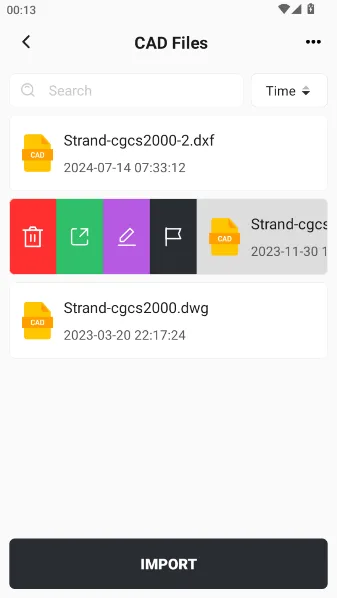
In engineering surveying projects, it is often necessary to handle multiple CAD design drawings. In order to facilitate centralized management of CAD files within the project scope, the system provides a dedicated CAD file library module in the Project menu. Users can import, export, edit, and stake CAD files here.
Click on [Projects] → [CAD Files] on the main page. After opening, you can see a list of CAD files. Click on a CAD file for more operations: delete, export, edit, and stakeout.
| Function | Description |
| Delete | Remove the CAD file |
| Export | Export the file to the controller storage |
| Edit | Jump to Edit CAD |
| Stakeout | Jump to Stake CAD |
Click [Import] at the bottom to copy the CAD files in the controller to the current project.
 |
📌
Note: When backing up the project to the cloud or importing/exporting, files from the CAD Files will be included.